
A CRM that fills itself
Companies and people arrive from the documents you already have, every field carrying the source it came from. Ask in plain words for anything else.
Contact data that updates itself
Typed data starts going out of date the day it is entered. Well reads your documents instead, so the fields stay current without anyone maintaining them.
| Company name | Registered name | Domain | Country | Industry | Tax ID | Primary contact | Open balance | ||
|---|---|---|---|---|---|---|---|---|---|
| 1 |  | stripe.com | |||||||
| 2 |  | qonto.com | |||||||
| 3 |  | mercury.com | |||||||
| 4 |  | slack.com | |||||||
| 5 |  | xero.com | |||||||
| 6 |  | pennylane.com | |||||||
| 7 |  | hsbc.com | |||||||
| 8 |  | asana.com | |||||||
| 9 |  | sage.com | |||||||
| 10 |  | dropbox.com | |||||||
| 11 |  | agicap.com | |||||||
| 12 |  | dext.com | |||||||
| 13 |  | box.com | |||||||
| 14 |  | notion.so | |||||||
| 15 |  | figma.com | |||||||
| 16 |  | linear.app | |||||||
| 17 |  | vercel.com | |||||||
| 18 |  | ramp.com |
One company, every record attached
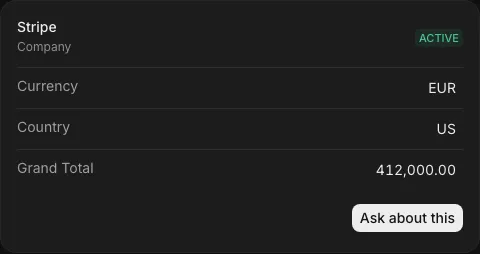
Contacts and companies are where it starts. Well keeps the records that prove the relationship attached to them, linked as they arrive.
Add a column by asking for it
The record types arrive ready. The columns on them are yours: ask for one, say what belongs in it, and every row fills.
- Six column typesText, number, amount, and two kinds of select. The sixth is filled by AI, one value per row.
- Views that stay putColumns, sort, filters, grouping and layout save together, and open that way for the team.
- On any record typeThe same applies across every records table, not just companies and people.
Add a risk level column to companies
Columns on companies
- Company name
- Domain
- Tax ID
- Open balance
- Risk levelAI
Ask, and the answer shows its work
Every answer names the records behind it, so you can open the invoice that produced a number instead of taking it on trust.
Skills that answer questions about clients
Who owes you, who is worth most, what they last paid. Add a skill, ask, and see the record behind it.
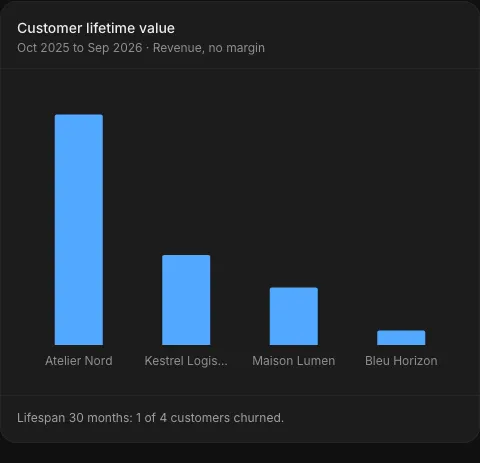
Rank clients by LTV
Rank your most valuable customers by lifetime value, over a year you name or their whole life.
Recurring revenue
See the monthly run-rate of live subscriptions, or an invoice average when no typed subscriptions are present.

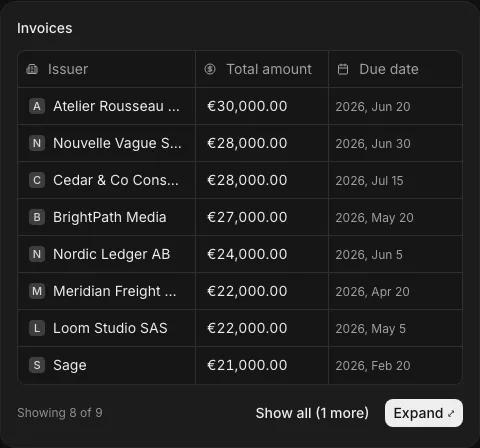
Receivables aging
See which customers still owe you money: the unpaid and overdue invoices, how late each is, and the total.

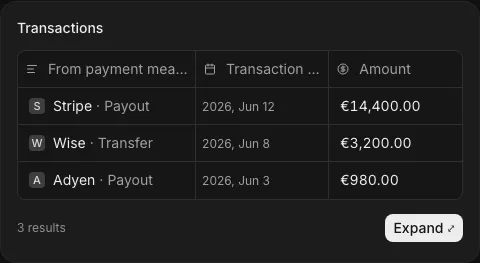
Payment and invoice lookup
Find what payment settled an invoice, or catch every payment that never got one.
Frequently asked questions
How is this different from HubSpot?
HubSpot is a marketing and sales CRM — it tracks deals, emails, and pipeline stages. Well is a financial CRM — it enriches company profiles with real invoice data, payment history, and revenue from your actual business tools. No manual entry, no stale data.
Can I import existing CRM data?
Yes. You can import contacts and companies from CSV or connect directly to your existing CRM. Well will then layer business data on top — enriching every record with invoice history, payment behavior, and revenue attribution.
What data gets enriched automatically?
Company firmographics (legal name, address, tax ID, industry), financial relationships (invoices, payments, transactions), and AI-generated insights (revenue ranking, payment speed trends, risk signals). All sourced from your connected business tools and public registries.
Does it replace my CRM?
It can, or it can complement it. Well works as a standalone financial CRM or as a financial enrichment layer on top of your existing CRM. Many teams use Well alongside HubSpot or Pipedrive for the business data those tools lack.
What tax jurisdictions are supported?
Well supports 15+ tax jurisdictions across the EU, UK, and US. Tax IDs, VAT numbers, and compliance data are automatically validated and linked to company profiles.
Can I see payment history for a specific company?
Yes. Every company profile includes a full financial timeline — every invoice, payment, and transaction linked to that company, with status indicators, amounts, and dates. AI also highlights trends like slowing payment speed.
Is it GDPR compliant?
Yes. Well only enriches from business registries and your own connected business tools. No personal data is scraped without a legal basis. All data is stored in your workspace with full audit trails and data processing agreements available.
See your financial relationships
No setup fee. No CSV imports. Connect your tools and watch your CRM fill itself with financial truth.